Vous souhaitez savoir comment rechercher des personnes sur CashApp ? Identifier une personne vous permet de demander des paiements, d’envoyer de l’argent et de vérifier son identité, évitant ainsi les transactions frauduleuses. Heureusement, CashApp propose plusieurs fonctionnalités intégrées, ainsi que des outils externes, pour vous aider. Cet article vous guidera pas à pas dans la recherche d’un utilisateur sur CashApp à l’aide de son nom, de son identifiant $Cashtag, de son nom d’utilisateur, de son numéro de téléphone ou de son adresse e-mail.
Qu'est-ce qu'une application Cash App ?
Cash App est un service de transfert d'argent entre particuliers et une plateforme non bancaire. Grâce à l'application, vous pouvez envoyer et recevoir de l'argent, déclarer vos impôts gratuitement, investir en bourse et en cryptomonnaies, ou même utiliser une carte de débit (en option). Cette application facilite les paiements sans contact et sans espèces, notamment pour les transactions informelles. Par exemple, vous pouvez facilement partager l'addition d'un café avec des amis, envoyer une facture de services publics à vos colocataires ou effectuer d'autres transferts d'argent sans utiliser votre compte bancaire traditionnel.
Comment les escrocs utilisent-ils Cash App ?
Cash App fonctionne sur votre smartphone comme un portefeuille numérique. Conçue pour être simple et rapide, elle est souvent exploitée par les escrocs. Voici quelques tactiques courantes qu'ils peuvent utiliser :
- Hameçonnage : Ils peuvent envoyer de faux courriels ou SMS prétendant provenir du service d'assistance de Cash App pour vous inciter à partager vos identifiants de connexion.
- Ventes fictives et arnaques « Sugar Daddy » : Les escrocs promettent des biens, des services ou l'accès à de grosses sommes d'argent en échange d'un petit paiement initial, puis disparaissent.
- faux sondagesLes escrocs peuvent aussi se faire passer pour des entreprises légitimes et vous demander de répondre à des sondages. Dans ces sondages, ils peuvent vous demander des informations personnelles ou vous proposer d'acheter un produit à prix réduit, ce qui n'est en réalité qu'un prétexte pour vous soutirer de l'argent.
- Imitation: Ils pourraient se faire passer pour un ami dans le besoin ou pour une organisation de confiance demandant de l'argent de toute urgence.
- Escroqueries : Ils prétendent vous permettre de « faire fructifier » votre argent et d'obtenir un rendement exceptionnel si vous envoyez des fonds via Cash App.
Comment trouver quelqu'un sur une application Cash App ?
Sachant comment opèrent les escrocs, vous devriez toujours vérifier l'identité de quelqu'un Avant d'effectuer une transaction avec eux sur CashApp, voici les principales méthodes, y compris l'utilisation d'un outil de recherche CashApp si nécessaire.
Recherche avec $Cashtag
La plupart des gens préfèrent créer un identifiant public $Cashtag pour recevoir des fonds. Il s'agit également d'un identifiant unique et personnalisable (par exemple, $JohnDoe). Pour effectuer une recherche avec cet identifiant :
- Appuyez sur l’onglet « $ » sur votre écran d’accueil.
- Cliquez sur le bouton « Payer ».
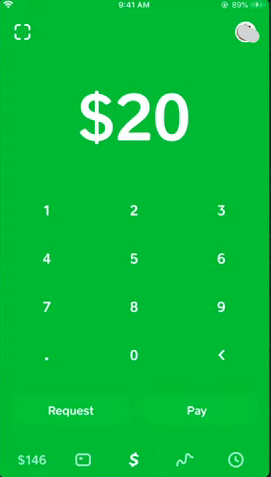
- Dans le champ « À », saisissez le code $Cashtag exact.
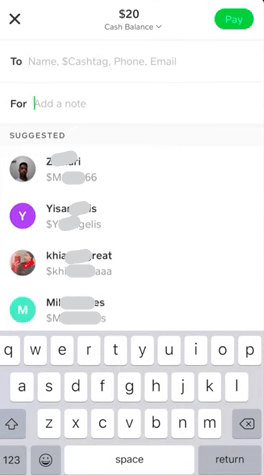
- Lorsque le profil est valide et public, vous pouvez voir son nom et son image.
- Nous vous recommandons également de rechercher le hashtag $Cashtag pour voir s'il existe d'autres plaintes à leur sujet.
Recherche par nom d'utilisateur Cash App
Vous pouvez également utiliser cette méthode pour rechercher une personne par son nom d'utilisateur. Le nom d'utilisateur est le nom affiché par l'utilisateur sur son profil. Il est différent du Cashtag et ne comporte pas le symbole dollar. Voici comment fonctionne la recherche inversée dans Cash App :
- Touchez le logo $ puis accédez à l'écran « Payer ».
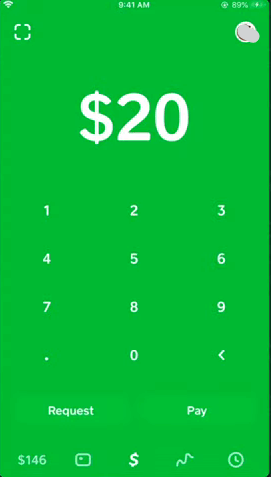
- Saisissez le nom d'utilisateur dans le champ « À », et Cash App affichera le profil correspondant.
Recherche par numéro de téléphone
La recherche par numéro de téléphone fonctionne également. Toutefois, cela dépend du fait que le destinataire ait associé son numéro à son compte Cash App. Vous devez également enregistrer son numéro dans votre répertoire.
- Vous pouvez cliquer sur l'icône de recherche en bas de votre écran.
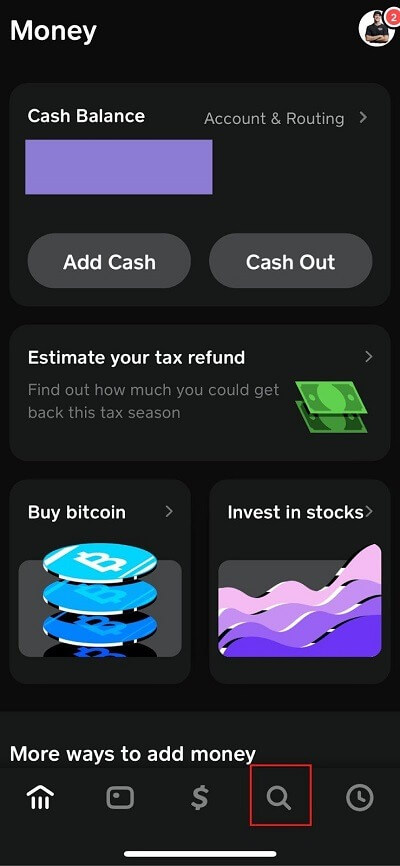
- Vous accédez ainsi à une fenêtre où vous pouvez saisir leur nom ou leur numéro de téléphone pour les retrouver.
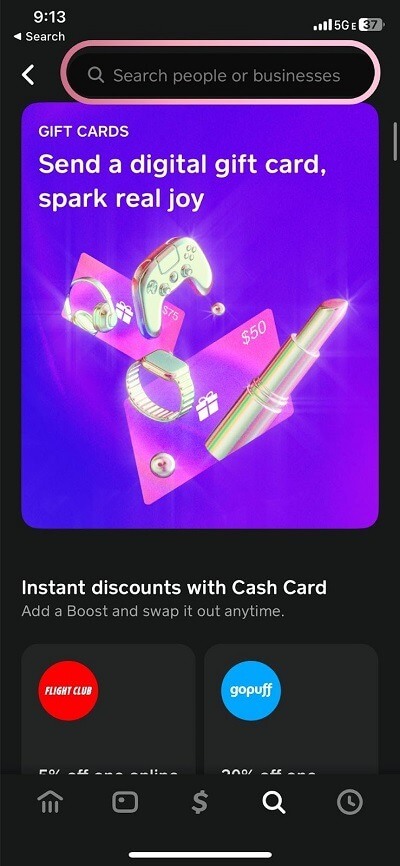
- Vous pouvez également utiliser l'icône dollar, puis sélectionner l'écran de paiement.
- Saisissez ensuite leur nom ou leur numéro dans le champ « À » pour afficher leur profil correspondant.
Recherche par adresse e-mail
Une autre méthode efficace pour trouver un destinataire sur Cash App consiste à utiliser son adresse e-mail. N'oubliez pas que cela dépend également du fait que le destinataire ait lié son adresse e-mail à son compte. Vous devez également enregistrer cette adresse e-mail dans vos contacts. Voici comment procéder :
- Accédez à l'écran « Payer ».
- Dans le champ « À », saisissez l'adresse électronique.
- Si un compte Cash App y est lié, il apparaîtra comme une suggestion.
Vérifier la liste de contacts
Cash App analyse également le répertoire de votre téléphone pour vous montrer les personnes déjà inscrites sur la plateforme. L'objectif est de simplifier au maximum vos paiements. Pour configurer cette fonctionnalité :
- Accédez à l'icône « Profil » située en haut à droite.
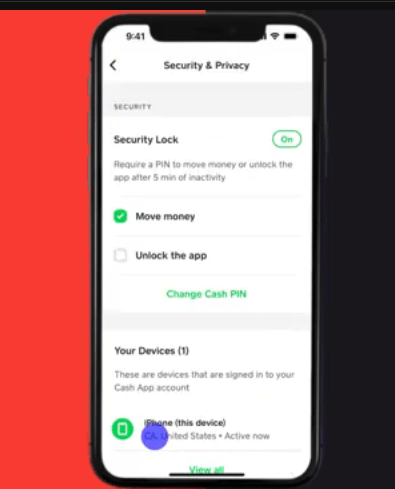
- Une fois dans la section profil, faites défiler vers le bas.
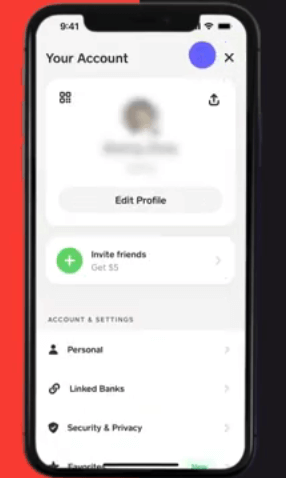
- Sélectionnez « Confidentialité et sécurité »
- Ensuite, cliquez pour sélectionner votre appareil.
- Ensuite, sélectionnez « Synchronisation des contacts » et activez-la.
- Vous pouvez maintenant retourner à l'écran « Payer ». Une fois que vous aurez saisi leur nom ou leur numéro, vous verrez vos contacts qui utilisent l'application.
Scannez un code QR
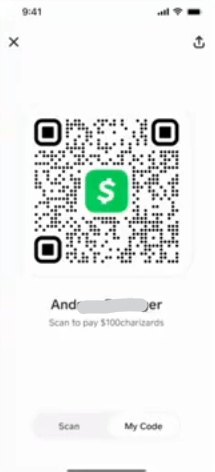
Chaque utilisateur de Cash App possède un code QR unique pour des paiements instantanés et sans erreur. C'est idéal pour payer vos amis lors de vos rencontres. Ils peuvent également vous envoyer une capture d'écran de leur code QR Cash App que vous pouvez scanner facilement pour effectuer un paiement. Voici comment l'utiliser pour votre recherche Cash App :
- Sur l'écran principal, recherchez le petit code QR dans le coin supérieur gauche.
- Vous pouvez également, à partir de l'icône de profil située dans le coin supérieur droit, appuyer sur le bouton « Scanner ».
Quelqu'un peut-il découvrir qui je suis sur Cash App ?
Les utilisateurs de CashApp peuvent créer un identifiant public, par exemple $Cashtag, ou utiliser leur numéro de téléphone ou leur adresse e-mail pour leurs transactions. Cependant, il est impossible de relier ces informations à votre nom complet ou à votre adresse postale. Par conséquent, à moins de partager volontairement ces informations avec quelqu'un, votre identité réelle reste confidentielle pour les autres utilisateurs de l'application.
FAQ
Peut-on retrouver une personne via une application Cash App ?
Tout dépend de ce que vous savez de cette personne. S'il est impossible de découvrir son identité physique du jour au lendemain, vous pouvez la vérifier si vous connaissez son adresse e-mail ou son numéro de téléphone associés à son compte Cash App. Seules les forces de l'ordre, munies d'un mandat judiciaire, peuvent demander ces informations à Cash App.
L'application Cash App révèle-t-elle les noms ?
Non, votre identité reste entièrement privée. Les autres utilisateurs ne peuvent trouver votre profil qu'à l'aide de votre identifiant $Cashtag, de votre numéro de téléphone ou de votre adresse e-mail. Ils peuvent également vous identifier si vous utilisez la même photo de profil. Votre nom légal ne sera jamais visible. Cash App affichera uniquement le nom que vous avez choisi. Votre adresse postale, votre date de naissance et toute autre information personnelle que vous n'avez pas rendue publique ne seront pas visibles.
Est-il possible de masquer son profil dans les résultats de recherche ?
Oui, vous pouvez désactiver des fonctionnalités comme la « Synchronisation des contacts » dans les paramètres « Confidentialité et sécurité ». Cela empêchera qu'on vous retrouve grâce à votre numéro de téléphone. Toutefois, votre compte $Cashtag restera visible, sauf si vous le configurez également en mode privé.
Conclusion
Avant de faire affaire avec une personne sur Cash App, n'hésitez pas à utiliser les différentes méthodes pour l'identifier. Il est toujours prudent de vérifier son identité via Cash App et d'utiliser des astuces externes, comme expliqué dans cet article. Ainsi, vous protégez votre tranquillité d'esprit et vos actifs contre les personnes mal intentionnées qui cherchent à vous voler votre argent.