Do you often misplace your phone at home or worry about losing it when you’re out? If you use the AT&T network, it’s much easier to track its whereabouts. AT&T’s services and built-in phone locator features offer everything to check in safely and respectfully. In this guide, we will walk you through using AT&T’s phone locator, along with additional helpful apps and tools, to ensure you can locate your phone in any situation.
What is an AT&T phone locator?
The AT&T phone locator isn’t a standalone solution. In reality, it is included with your AT&T Secure Family App. The entire objective of the app is to help you view the current location of all your connected family devices(up to 10 devices) on an interactive map, with street or satellite views. You can also set it up to locate your phone and track its location for over seven days.
Plus, you can set boundaries around frequently visited places like home, school, and work and receive automatic arrival and departure alerts. You can also push a button at any time to send emergency alerts to trusted contacts. There are also additional features to manage screen and app usage.
How to locate my AT&T phone?
Ultimately, when used correctly, your AT&T phone locator is a fantastic safety and device management tool. Let’s discuss the steps to implement it, along with additional third-party security apps for comprehensive protection.
Use AT&T Secure Family
Once you have the AT&T family plan, the following steps are effortless. The service costs $9.99 per month, and you can access your device’s location via a web-based dashboard or the mobile app. So, once you’ve set up the AT&T Secure Family app on your phone, it automatically begins tracking that device. There’s also the AT&T companion app, but that’s for a second device or your family and loved ones. Here’s how to set up your own AT&T Secure Family app to begin using it:
- First, sign up using the original myAT&T app or website. Remember, this is your account management app, not the tracking app.
- Next, go to “Manage Add-ons” and pick the “AT&T Secure Family.”
- Alternatively, you can download the main Secure Family app to your parents’ phone.
- Open the app and then register your AT&T account. You’ll need your mobile number to complete the subscription.
- Confirm that your subscriptions are up to date.
- Go to the “Family Hub” either on the myAT&T app or download the Secure Family app on your smartphone.
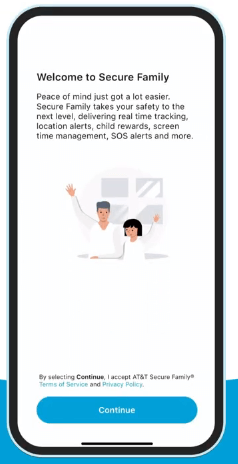
- Sign in with your phone number and other important information.
- When prompted for profile, select “Adult Admin”
- Now add yourself by clicking the “+” icon and then enter your name and phone number.
- You’ll receive an invitation via text.
- Go to your phone’s settings and ensure your location is set to “Always On” so the device is tracked even when the app is closed.
- Remember, you can also set up tracking for other loved ones. But that’s not the purpose of our guide.
- If your smartphone is missing, you can log in to a computer or another tablet at ATT.com/securefamily to view the map.
Set up theft Alerts for Android devices
Furthermore, if you use an Android smartphone, you should additionally set up AT&T ActiveArmor advanced mobile security. This app provides alerts for multiple failed PIN or passcode attempts, Airplane mode enabled, the phone turned off, and a SIM card removed. You need either the “Unlimited Premium” or “Extra” plan. Then follow these steps:
- Open the MyAT&T app and under “Manage Add-ons,” select the ActiveArmor app.
- Now download it on your Android device
- Select continue and grant app permissions.
- You’ll be prompted to run a quick malware scan.
- You’ll need to enter a valid email address during set-up to help you receive alerts.
- Once on the homepage, you can customize which alerts you receive by selecting the Menu icon, then Settings.
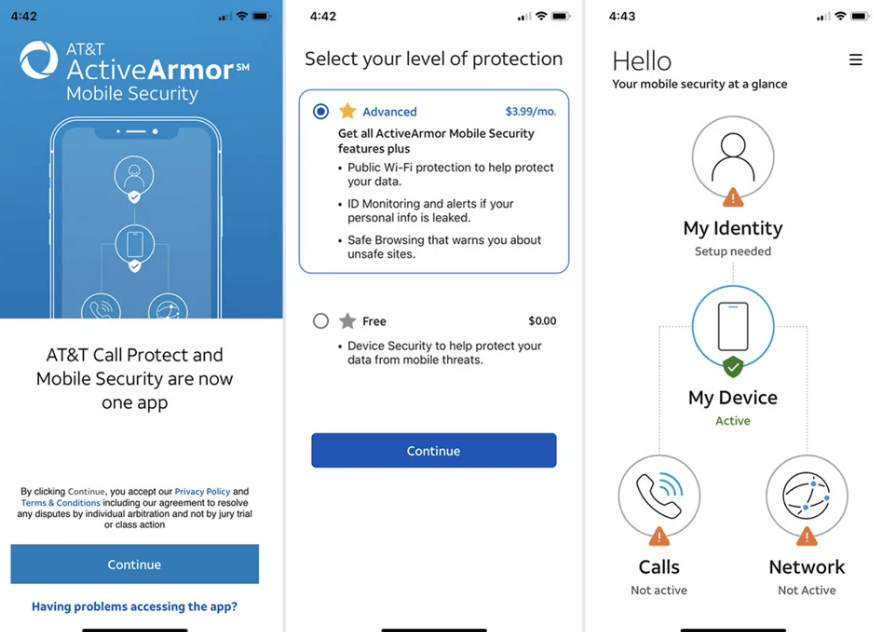
- Next, toggle the alerts you want on or off.
Google Find Hub
If you don’t wish to use the AT&T Secure Family Plan, you can still use the Google Find Hub to keep track of your own devices. This requires a Google or Gmail account to get started, and you can use Google Find Hub on both Android and iOS devices to locate your smartphone at any time. Here are the steps you need:
- Install the Google Find My Device app on your Android device. You’ll use it to track your devices and share your location with your loved ones.
- Go to “Settings”, then “Security”, “Find My Device” and toggle on.
- Make sure your location and Wi-Fi are also enabled automatically.
- Whenever you need to locate your device, go to the Google Android Find website on another computer or device.
- Next, select “Sign in as Guest”
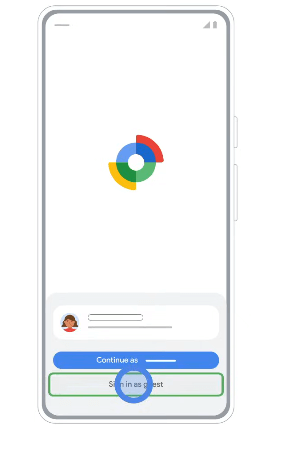
- Enter the same Google account on that lost phone.
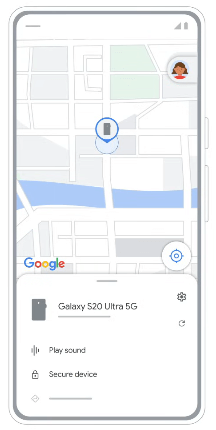
- You’ll see a dashboard with a map showing the device’s location.
- From there, you can set the phone to ring at full volume, lock it with an existing passcode, or erase the device.
Apple Find My Devices
Apple Find My Network is a seamlessly integrated solution that helps you track your smartphone. It’s also suitable for locating your other Apple devices, provided they are signed in to the same iCloud/Apple ID and on the same network. Here’s how to set up:
- Open “Settings” and tap your name.
- Go to “Find My” and enable it.
- Ensure that “Find My network” and “Send Last Location” are turned on.
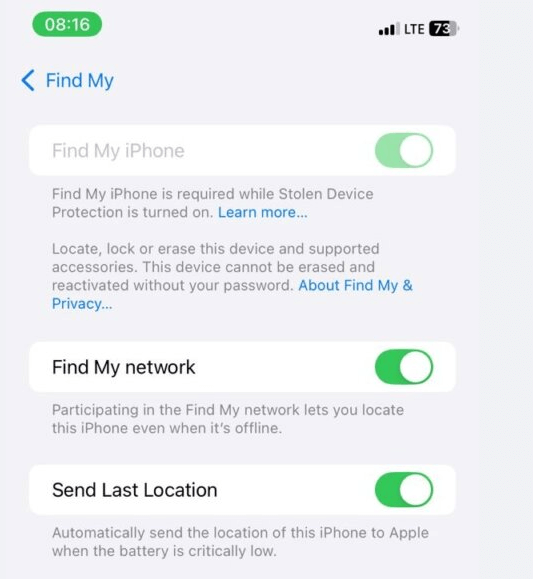
- Now, to locate your own devices. Open the Find My app on another Apple device or by visiting iCloud.com/find
- Next, sign in with your Apple ID.
- Select the device from the list to see its location on a map.
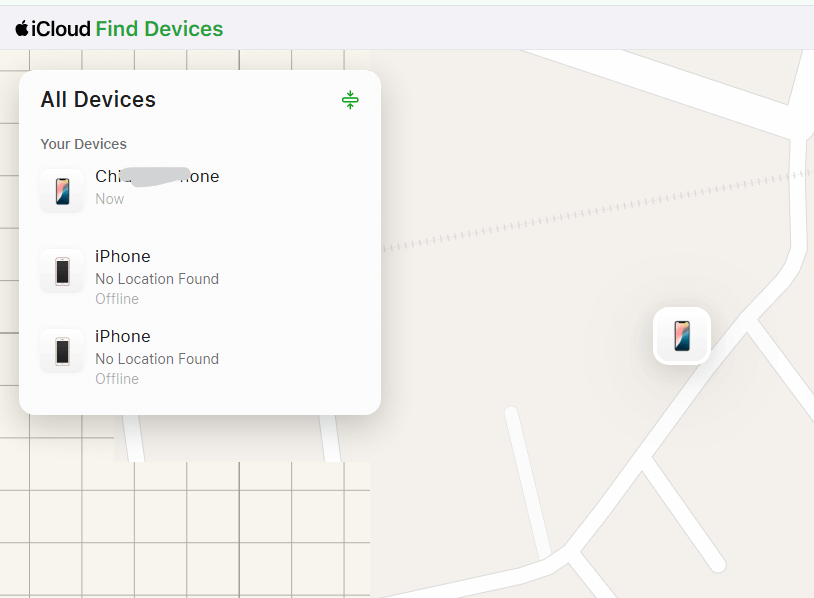
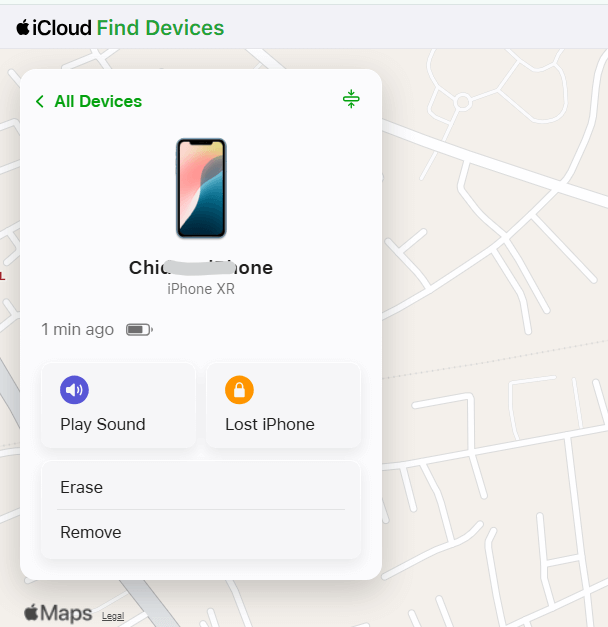
- You can also make the device play a sound, enable Lost mode, or erase it.
Contact AT&T support
If you can’t access your AT&T Family Locator, you can also contact AT&T customer support. They won’t provide real-time GPS tracking for privacy and security reasons. But the support agents can still help. For instance, they can assist with troubleshooting your Family Locator and app. They can also initiate a network-based locate (such as pinging a device) when law enforcement is involved. They can also help you suspend service to that lost or stolen phone. To contact support, you can either use the MyAT&T app or call 800-331-0500.
Try phone number locator
A great alternative to AT&T Find My Phone, even without network access, is a third-party phone number locator. These fantastic solutions require a phone number to get started with a suitable setup for multiple family devices. You’ll love how tools like LocatePhone provide just as granular phone geolocation, regardless of the distance between you and your devices. Here’s how to get started:
- Go to the LocatePhone online phone number locator.
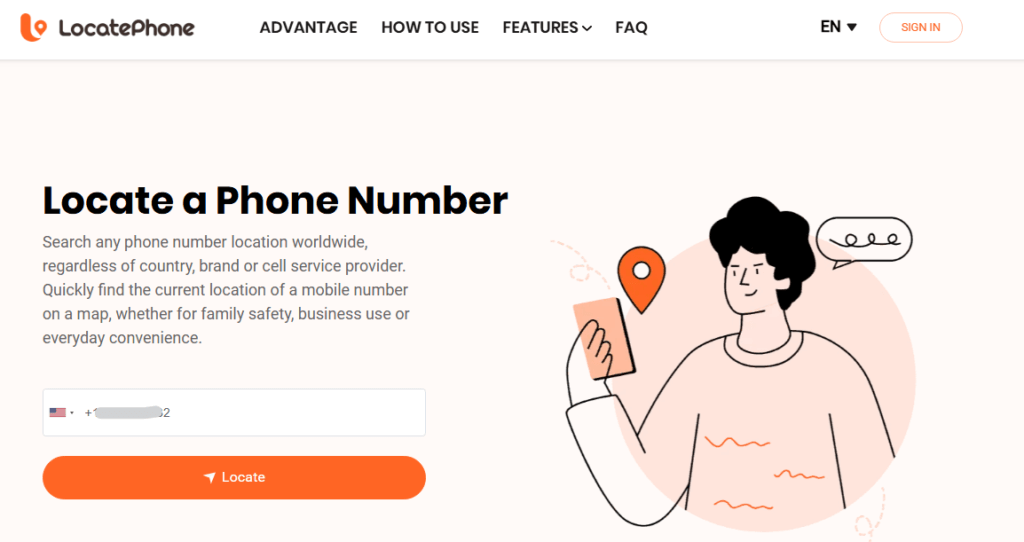
- Enter your phone number and hit the locate button.
- Once the initial connection has been established, you’ll enter your email address.
What to do if you can’t find your device?
If your phone is lost or stolen, you should report it immediately to protect your personal information. Follow these steps below:
- Lock or wipe your device
First, open your “Find My” app on Google, Apple or the AT&T Smart Family app. In the app, you can try to locate your phone or make it ring. These apps can also help you lock the device using the “Lock” or “Lost Mode” feature in your locator app. When recovery is impossible, hit the “Erase Device” function. Note that this permanently deletes all data and prevents you from tracking the device.
- Suspend device
Consider calling AT&T at *611# from another phone to suspend wireless service on the missing device. You’ll need to confirm your identity for the approval to go through. That said, this step helps avoid unwanted calls, data usage and charges while preserving the phone number.
- Change password
Consider changing all passwords you use to log in to accounts on your device, starting with your financial and social media apps, email, and Apple ID/Google accounts.
- Check accounts
Proactively monitor your email, bank and credit card statements for any unusual activities. This helps prevent any further attempts by scammers to access your accounts.
FAQ
Can I track a phone through my carrier?
Yes, AT&T offers family locator services you can subscribe to, especially for locating your children and elderly parents. That said, not all carriers provide locator services. In such situations, you should use other apps, such as Google Find My Hub, Apple Find My, and LocatePhone.
Does AT&T have a GPS tracker?
No, AT&T does not offer a GPS tracker for standalone or personal location tracking. You can access that only with an AT&T Smart Family subscription, which combines GPS, Wi-Fi, and network data to provide accurate location services for all your enrolled devices.
Can AT&T track a family member?
Yes, you can, especially when they are registered to your AT&T Smart Family service. Note that to track family members over 18, they must consent to the service. Regardless, the AT&T Family Locator is designed for family safety and screen time monitoring.
Conclusion
Now you know all the best ways AT&T helps locate your phone. Plus, you have a variety of built-in tools such as Apple Find My, Google Find My Device and LocatePhone. Setting up a combination of location-tracking tools gives you a clear plan for emergencies and increases your chances of recovering your smartphones. Remember to set up these services in advance and act quickly when needed. Ultimately, you can enjoy the invaluable peace of mind that comes with your own device’s security.